GeneratePress Review: The Best WordPress Theme for Profitable Blogs
When building a profitable WordPress blog, the GeneratePress theme is an optimal choice due to its lightweight nature, speed, and excellent Search Engine Optimization (SEO) performance. This article analyzes PageSpeed Insights test results for GeneratePress and provides specific methods to improve the SEO score to 100 by changing 'Read more' text to 'Read Full Article' on category pages.
The Importance of Choosing a Profitable WordPress Theme: Speed and SEO Friendliness
One of the biggest challenges in creating a profitable WordPress site is selecting the right theme. While traditional blogging platforms offer verified skins, the WordPress ecosystem is different. There are countless themes available; some are simple to use, while others are so complex they require coding knowledge and significant experience just to set up.
Complex and heavy themes hinder web page loading speed, which leads to poor Core Web Vitals and lower search rankings. Therefore, to build a profitable WordPress blog, choosing a lightweight and fast theme like GeneratePress is essential for maintaining long-term SEO performance.
GeneratePress Theme: Building a Profitable Blog with Lightweight Design and Accessibility
GeneratePress is one of the lightest WordPress themes available, making it accessible even for beginners. It is simple enough to install and immediately focus on content creation without the need for complex SEO configurations.
Because the core file size of GeneratePress is extremely small, it minimizes server load and ensures a fast Time to First Byte (TTFB). This is the absolute fundamental of WordPress optimization.
GeneratePress is ready to use right after installation, making it the best choice for users starting their first WordPress blog. The following table compares the performance of GeneratePress with other popular themes.
| Theme Name | File Size (Uncompressed) | Key Features | SEO Friendliness |
|---|---|---|---|
| GeneratePress | Under approx. 30KB | Extremely lightweight, modular design | Excellent (Speed-based) |
| Astra | Under approx. 50KB | Versatile, many starter templates | Good |
| Divi | Over approx. 500KB | Built-in visual builder, feature-rich | Average (Requires speed optimization) |
In-depth Performance Testing of GeneratePress (PageSpeed Insights Analysis)
To prove the actual performance of the GeneratePress theme, I conducted a test on PageSpeed Insights using a post containing standard images and one sidebar advertisement. Since GeneratePress is inherently fast, I tested it under a slow 4G mobile environment to reflect real-world conditions.
Test Pages: Main Page (Archive), Single Post Page, Category Page
1. Profitable Blog Main Page Test Results
Scores were 100 across all metrics except for a 99 in Performance (LCP: Largest Contentful Paint and INP: Interaction to Next Paint were both excellent).
2. Profitable Blog Post Page (Single Post) Test Results
Next, I tested the individual post page, which is the core of content exposure and traffic. The speed of this page directly impacts the influx of visitors through long-tail keywords.
Score: 100/100 (Achieved perfect performance and SEO optimization on the most important content page).
3. Category Page Test Results and Initial Problem Identification
Since category pages list multiple posts, issues regarding layout stability (CLS) and SEO can occur during initial loading. The initial test revealed a specific issue.
SEO Score: 92, all other performance metrics: 100 (Only the SEO score was slightly lower).
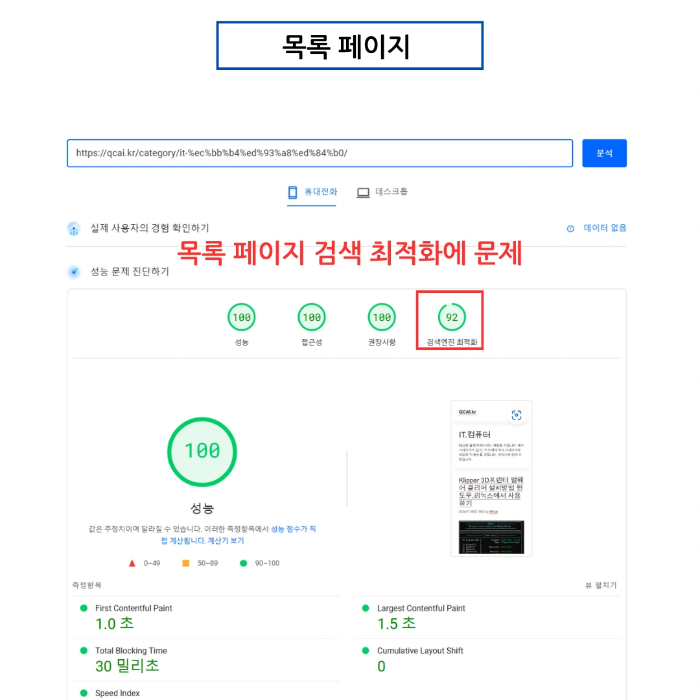
Resolving the 92 SEO Score Issue: Explicit Anchor Text Strategy
4. Analyzing Category Page Issues: Lack of Descriptive Anchor Text
Based on the SEO audit, the problem was the lack of descriptive anchor text. Anchor text is crucial information that tells search engines the topic or content of the linked page.
The Problem: The 'Read more' link provided below post excerpts on the category page.
SEO Issue: Search engines find it difficult to determine exactly what the user is 'reading more' of. This is flagged because 'links do not contain descriptive text,' resulting in a lower SEO score.

The solution is to change 'Read more' to a more explicit phrase like 'Read Full Article.' This simple modification provides search engines with specific information about the destination page, significantly improving understanding. I implemented this change by modifying the text within the WordPress theme files (functions.php or theme settings).

5. Category Page SEO Results: Achieving 100/100 and Conclusion
After updating the anchor text, the category page SEO score perfectly improved from 92 to 100.

Read more (92 Points) - Read Full Article (100 Points)
This demonstrates that GeneratePress has exceptional baseline performance and can achieve perfect SEO scores with minor adjustments. Even without coding knowledge, the theme is highly effective for profitable blogs right out of the box. The conclusion is that even the free version of GeneratePress is powerful enough to build a high-performance blog. You can find more information at the official GeneratePress website.
The Positive Impact of GeneratePress on Core Web Vitals
GeneratePress performs exceptionally well because its lightweight design directly influences Google's Core Web Vitals. The following table summarizes the relationship between key metrics and GeneratePress.
| Core Web Vital Metric | GeneratePress Contribution | Improvement Effect |
|---|---|---|
| LCP (Largest Contentful Paint) | Small CSS, minimal DOM structure | Displays content faster by minimizing render-blocking elements |
| INP (Interaction to Next Paint) | No unnecessary JavaScript | Reduces main thread occupancy for faster interaction response |
| CLS (Cumulative Layout Shift) | Fixed layout, stable CSS loading | Minimizes element shifts, ensuring visual stability |
Q: Can I run a profitable blog with the free version of GeneratePress?
A: Yes, it is definitely possible. The free version provides the core benefits: lightweight speed and an excellent SEO structure. While the paid version (GP Premium) offers more design features and customization options, the free version is more than sufficient for writing content and displaying ads. I recommend starting with the free version and upgrading as your traffic grows.
Q: Do I still need an SEO plugin when using GeneratePress?
A: While GeneratePress is SEO-friendly by design, using a professional SEO plugin like Yoast SEO or Rank Math helps you manage technical aspects like meta tags, sitemaps, and schema markup more easily. It is not mandatory for beginners, but it enhances the overall efficiency of your search optimization.
Q: How does the lightweight nature of GeneratePress affect actual ad revenue?
A: Faster loading speeds positively influence ad revenue indirectly. Speed improves the user experience (UX), which lowers bounce rates and increases time spent on the page. This contributes to higher search rankings, driving more traffic. Furthermore, a good INP ensures the page responds quickly when a user clicks an ad, potentially increasing Click-Through Rates (CTR), which is directly linked to the success of a profitable WordPress blog.