How to Fix Potential Action Errors in Structured Data Markup
Learn the definition, major causes (missing required properties, typos), and specific solutions for Potential Action errors occurring in structured data (JSON-LD), a key element of website SEO. Optimize your search engine exposure and Sitelinks Search Box functionality by fixing these markup errors.
Understanding Structured Data Errors and the Core of Potential Action Issues
If you are a website operator concerned with Search Engine Optimization (SEO), you have likely heard of structured data (markup) at least once. Structured data plays a critical role in helping search engines like Google understand your website's content more accurately and improving how your site is displayed in Search Engine Results Pages (SERPs).
However, if this markup is incorrect, unexpected error messages can occur.
One of the frequently reported issues recently is the "Potential Action error." This error primarily occurs within the markup of JSON-LD scripts, and extra caution is needed if your site includes a search box feature or user interaction elements.
These errors can arise from various causes, ranging from simple coding mistakes to missing required properties. If left unaddressed, features may be omitted from Google search results, and it could negatively impact your SEO performance.
What is a Potential Action Error and What is the Solution?
A Potential Action error refers to a problem occurring in a website's structured data markup. This error mainly appears in JSON-LD scripts and causes issues with the accuracy of data interpretation. Consequently, it negatively affects search engine optimization (SEO) and can cause issues on the Search Engine Results Page (SERP).
Definition of Potential Action Elements and query-input
The Potential Action element defines specific actions a user can perform on a web page. In this context, the required user input is set as "query-input." When implementing a feature where users search by entering a query, "query-input" must be specified within the "potentialAction" element to define the user input.
Structured Data Issue Identification Message
An error message is displayed stating: "'Recently, 1 Sitelinks Search Box structured data issue was found on your site. This may affect user experience and Google Search exposure.'"
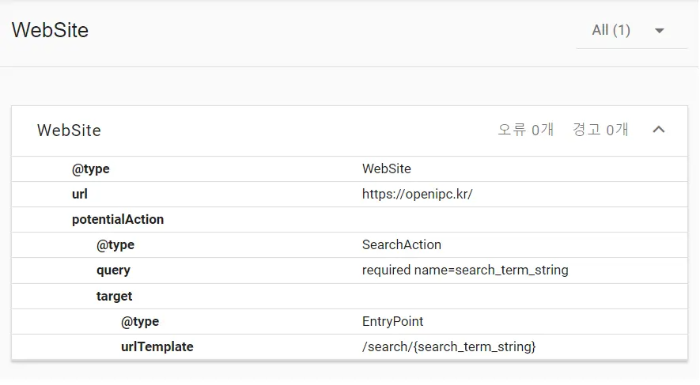
Detailed Analysis of Potential Action Error Causes
This error can occur due to various reasons. The following factors primarily have an influence:
- Typos: Simple typing errors within the markup lead to interpretation issues.
- Incorrect Data Format: Errors can occur if the data format does not comply with regulations.
- Missing Required Properties: A common cause is the omission of properties that must be included in structured data (especially
query-input).
Response Methods and Importance of Markup Review
To prevent and resolve these errors, you must review the structured data markup of your web pages. It is important to use the correct data formats and properties and to ensure that the website's content remains consistent with its structured data. Additionally, applying the latest version of data markup should reduce the possibility of errors occurring.
Structured Data Error Resolution Strategy and Regular Inspection
Necessity of Regular Inspection and Updates (SEO Optimization)
Regular inspection and updating of structured data can have a positive impact on SEO. Through this, you can improve your website's search engine ranking and discover and correct errors in advance.
Step-by-Step Methods to Resolve Potential Action Errors
To resolve Potential Action errors, the following steps should be considered:
- Check Online Data Formats and Links: Inspect whether all online forms and links are set up correctly.
- Review Web Page Structure and Code: Examine the structure and code of the web page where the problem occurs and proceed with necessary corrections or updates.
- Server and Network Inspection: Check server status and network connections; if problems exist, it could be an issue with server data.
The message that "query-input" is missing from the "Potential Action" element means that the information to be entered by the user has not been specified. Since this can significantly impact the completeness of structured data and search engine recognition, careful inspection and correction are required.
Q: Which schema is most closely related to Potential Action errors?
A: It is primarily related to the potentialAction property within the WebSite schema that implements a website's search functionality, specifically the SearchAction type. This schema is used to activate Google's Sitelinks Search Box.
Q: How long does it take for the corrections to be reflected in Google search results after fixing the error?
A: After fixing the error, you must request a 'Validation Fix' for the corresponding page through Google Search Console. While it may take several days to a few weeks for Google to re-crawl the page and process the markup, a validation request speeds up the reflection process.
Q: How should I correctly define the query-input property?
A: query-input is generally defined such as name="search_term_string" to specify a variable representing the search term entered by the user. This variable is substituted within the target URL template to generate the actual search URL. It is best to refer to Google's official structured data documentation for the exact format.